
Request Holiday
Holiday Submission Process: Easier, Structured, and Faster
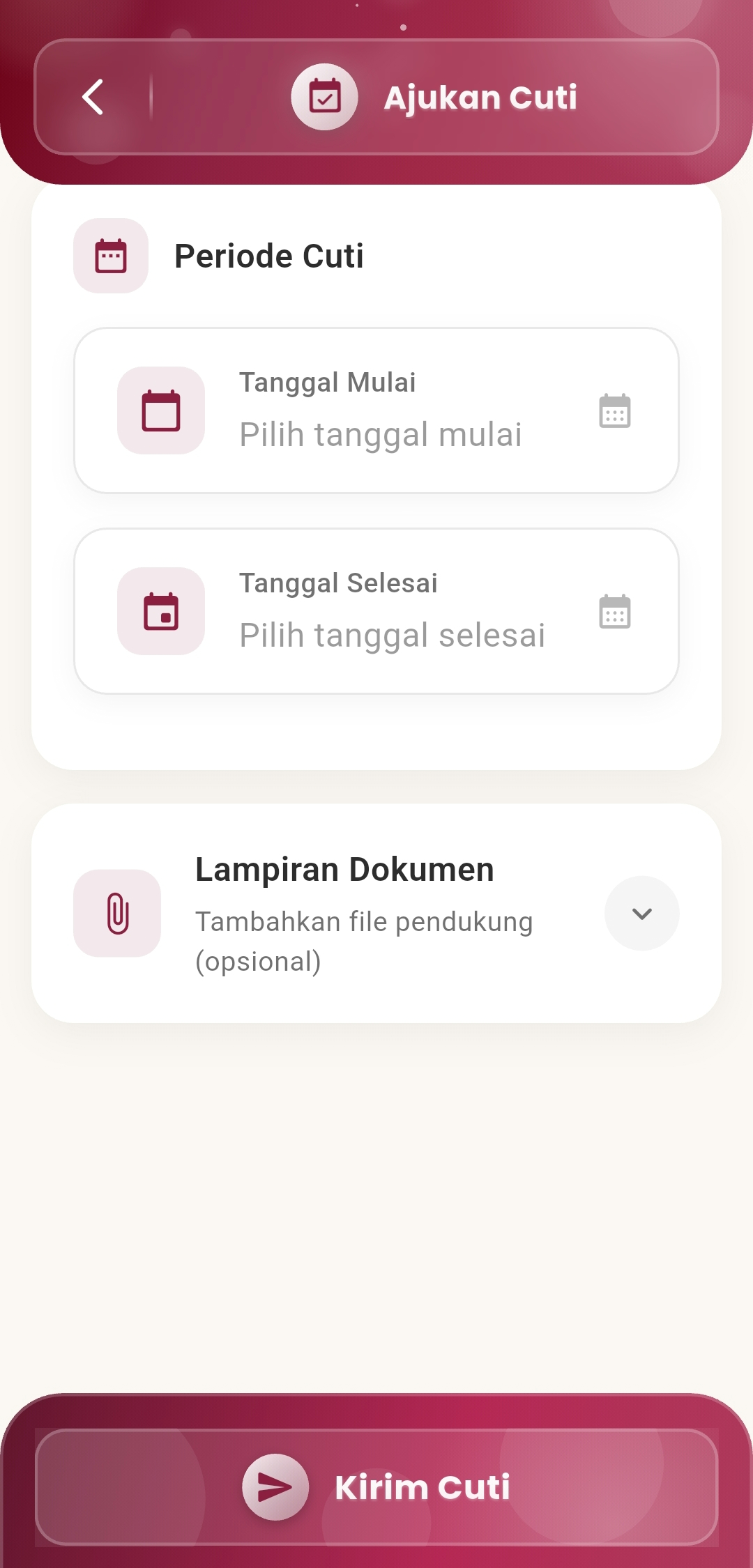
The Request Holiday menu is designed to make it easy for users to submit holiday requests directly from their mobile devices, without the need for manual processes or physical documents. With a clean and focused interface, users can set dates, attach supporting documents, and send requests in one simple step.
Main Features
-
Select Holiday Period
Users can flexibly determine their holiday time through two date inputs:
- Start Date: Determine the first day of holiday.
- End Date: Select the last day of the holiday period.
The system will automatically record the holiday duration based on the selected dates to facilitate administrative approval.
-
Supporting Document Attachment (Optional)
Options are available to attach additional files such as:
- Doctor's certificate
- Travel proof
- External assignment letter
This feature helps speed up the verification process without the need for additional manual confirmation.
-
Send Holiday Request with One Tap
Once all data is filled in, the user simply presses the "Send Holiday" button to:
- Submit the request to the internal system
- Mark the holiday request in the employment data history
- Start the approval process by the relevant parties
A notification will be received once the submission has been successfully sent.
If you need further assistance, contact us through the eSchool Help Page.