
Pay Slip
Easy Access to Your Monthly Pay Slip
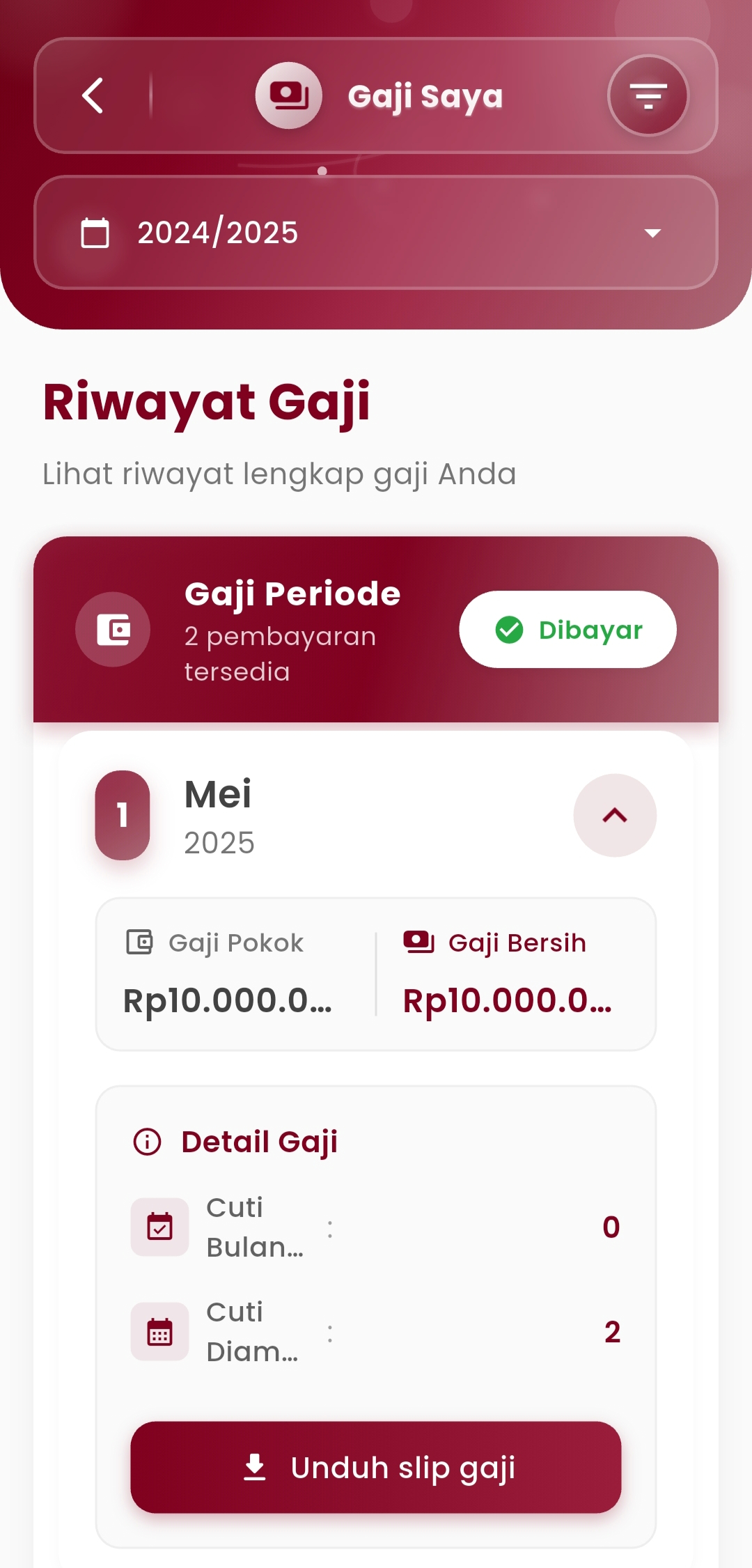
The My Salary menu makes it easy for every employee to monitor their salary payment history in a detailed and transparent manner. With a modern and intuitive interface, users can check their base salary, net salary, and monitor how attendance or holiday affects the salary amount received.
Main Features
-
Salary Period
The monthly salary list view is equipped with status indicators:
- ✅ Paid — indicates that the salary has been transferred
- 🔁 Option to view specific academic year periods
The "Salary Period" label also shows the number of payments that have been made available and can be reviewed.
-
Salary Summary
Each month displays two key pieces of information:
- Base Salary — the basic salary amount according to the contract
- Net Salary — the total salary received after deductions (e.g., due to holiday beyond quota)
The nominal format is displayed clearly and focused for easy reading.
-
Salary Details
This section breaks down factors that affect salary, such as:
- Monthly Holiday — the number of holiday days submitted in the respective month
- Unaccounted Holiday — indicator of holiday taken outside of procedures or without official submission
This data helps users understand potential salary deductions or adjustments.
-
Download Pay Slip
Users can press the "Download Pay Slip" button to:
- Obtain an official PDF pay slip document
- Use it as a supporting document for administrative purposes, loans, or personal records
If you need further assistance, contact us through the eSchool Help Page.